Prompt Zoom
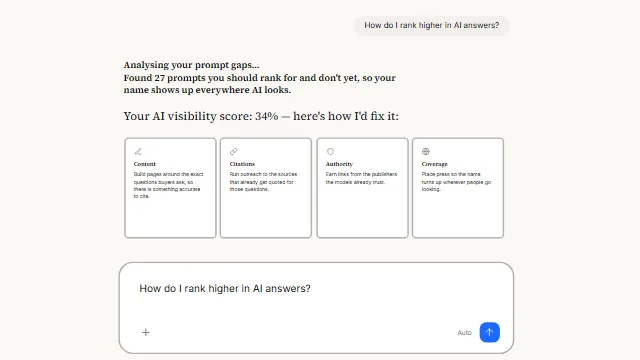
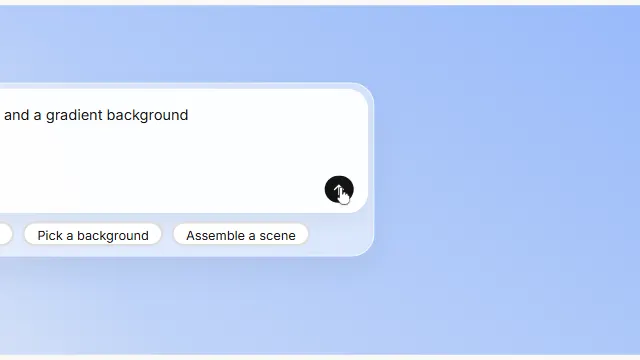
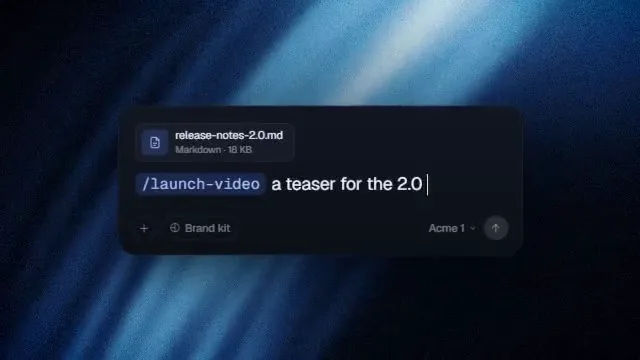
AI prompt zoom: an assistant home screen that cuts into the chat input as the prompt types. An assistant landing screen that offers its suggestions, then cuts — hard, in a single frame — into the caret, where the prompt types itself.
Source
components/kuchi/prompt-zoom.tsx
1"use client";23import { loadFont as loadSans } from "@remotion/google-fonts/Inter";4import { loadFont as loadSerif } from "@remotion/google-fonts/SourceSerif4";5import {6 AbsoluteFill,7 getRemotionEnvironment,8 useCurrentFrame,9 useVideoConfig,10} from "remotion";11import { inputStyleContext } from "@/components/kuchi/input";12import {13 mixOklch,14 resolveFont,15 type KuchiTheme,16 useKuchiTheme,17} from "@/lib/kuchi-ui";1819// Loaded through @remotion/google-fonts, never a CSS variable — a Remotion20// bundle has none of the app's CSS, so a `var(--font-…)` gets you the right face21// in the Player and a fallback in the mp4 (design-system rule 4).22const { fontFamily: SERIF } = loadSerif("normal", {23 weights: ["400"],24 subsets: ["latin"],25});26const { fontFamily: SANS } = loadSans("normal", {27 weights: ["400", "500"],28 subsets: ["latin"],29});3031export interface PromptZoomProps {32 /** The greeting above the field. */33 greeting?: string;34 /** Field placeholder, shown until the first character is typed. */35 placeholder?: string;36 /** The prompt that types itself once the cut has landed. */37 text?: string;38 /** Suggestion pills under the field. Empty by default — pass some to show39 * them. They are static: the shot belongs to the typing and the cut. */40 chips?: string[];41 /** Model label in the field's footer, and the effort beside it. */42 model?: string;43 effort?: string;44 /** Seconds at which typing begins. */45 typeStart?: number;46 /** Seconds at which the view cuts. Not a transition — one frame. It lands47 * *while the prompt is still being typed*, which is the whole gag. */48 cutAt?: number;49 /** Typing speed. 18 is what the reference measures. */50 charsPerSecond?: number;51 /** How far the cut pushes in. 2.547 is what the reference measures. */52 zoom?: number;53 /** Focal point of the cut, as a fraction of the frame. */54 focusX?: number;55 focusY?: number;56 /** The starburst mark. Defaults to `theme.primary`. */57 accentColor?: string;58 theme?: Partial<KuchiTheme>;59 mode?: "light" | "dark";60 /**61 * The face this scene paints its words in — a label from `fonts.ts`62 * ("Inter", "Space Grotesk", "Instrument Serif") or a CSS family you have63 * loaded yourself. Unset, the scene keeps the face it was designed around.64 *65 * Overrides `theme.fontFamily`, which is how a brand kit re-skins a whole66 * timeline from one value.67 */68 fontFamily?: string;69 speed?: number;70}7172// --- Pure helpers (unit-tested) -------------------------------------------7374/** Characters revealed by effective frame `fc`, clamped to `total`. */75export function typedCount(76 fc: number,77 startF: number,78 perFrame: number,79 total: number,80): number {81 if (fc <= startF) return 0;82 if (perFrame <= 0) return total;83 return Math.min(total, Math.floor((fc - startF) * perFrame));84}8586/**87 * The cut, as a hard boolean. There is no ramp and no easing on purpose.88 *89 * Measured on the reference: the wide view is intact on one frame and fully90 * pushed in on the very next (frames 39 → 40, 803ms → 824ms). Nothing in91 * between. Interpolating this — even over two or three frames — turns a cut into92 * a zoom, and the whole read of the shot is that it *snaps*.93 */94export function isZoomed(fc: number, cutF: number): boolean {95 return fc >= cutF;96}9798/**99 * Caret visibility. Solid whenever a character is actively landing, blinking on100 * a 1.06s cycle when it is not — which is what a real text caret does, and what101 * stops the shot looking frozen while the prompt waits to start.102 */103export function caretOn(fc: number, fps: number, typing: boolean): boolean {104 if (typing) return true;105 const halfCycle = 0.53 * fps;106 return Math.floor(fc / halfCycle) % 2 === 0;107}108109// --- Icons -----------------------------------------------------------------110111function Glyph({112 d,113 size,114 color,115 fill,116}: {117 d: string;118 size: number;119 color: string;120 fill?: boolean;121}) {122 return (123 <svg124 viewBox="0 0 24 24"125 width={size}126 height={size}127 fill={fill ? color : "none"}128 stroke={fill ? "none" : color}129 strokeWidth={1.8}130 strokeLinecap="round"131 strokeLinejoin="round"132 style={{ display: "block", flexShrink: 0 }}133 >134 <title>icon</title>135 <path d={d} />136 </svg>137 );138}139140/** Paths for the default chip set, in order. */141const CHIP_ICONS = [142 "M12 20h9M16.5 3.5a2.1 2.1 0 0 1 3 3L7 19l-4 1 1-4Z", // pencil143 "M22 10 12 5 2 10l10 5 10-5ZM6 12v5c3 3 9 3 12 0v-5", // cap144 "m8 6-6 6 6 6M16 6l6 6-6 6", // code145 "M17 8h1a4 4 0 1 1 0 8h-1M3 8h14v9a4 4 0 0 1-4 4H7a4 4 0 0 1-4-4Z", // cup146 "M12 3v18M3 12h18M5.6 5.6l12.8 12.8M18.4 5.6 5.6 18.4", // spark147];148149/**150 * The starburst that leads the greeting.151 *152 * Twelve rays with a solid hub, measured off the reference: they are roughly a153 * ninth of the mark's diameter and clearly separated, and their overlap at the154 * centre reads as a filled disc.155 *156 * Six bars, not twelve. A bar is centred on the origin so it draws a ray at both157 * ends — the first version stepped twelve bars by 15° and produced *twenty-four*158 * rays, which at a 19px mark is not a starburst, it is a dot.159 */160function Starburst({ size, color }: { size: number; color: string }) {161 const rays = Array.from({ length: 6 }, (_, i) => i * 30);162 return (163 <svg164 viewBox="0 0 24 24"165 width={size}166 height={size}167 style={{ display: "block", flexShrink: 0 }}168 >169 <title>Assistant</title>170 {rays.map((a) => (171 <rect172 key={a}173 x={10.9}174 y={1.6}175 width={2.2}176 height={20.8}177 rx={1.1}178 fill={color}179 transform={`rotate(${a} 12 12)`}180 />181 ))}182 <circle cx={12} cy={12} r={3.6} fill={color} />183 </svg>184 );185}186187// --- Main composition ------------------------------------------------------188189/**190 * An assistant's field that types a prompt into itself and, partway through the191 * sentence, **cuts** — hard, in a single frame — into the caret and keeps going.192 *193 * ## The cut is the component194 *195 * Everything here was taken off a frame-by-frame read of the reference, and the196 * one number that matters most is that the push-in happens between two adjacent197 * frames with nothing in between. It is a cut, not a move. The scale is198 * **2.547×** and it is anchored on a point that sits **10% across and 41% down199 * the input field** — which is exactly where the caret is.200 *201 * The typing starts *before* the cut and does not pause for it: the sentence is202 * already running when the frame snaps in, and carries straight on at the new203 * size. That is what stops the cut reading as a scene change — there is one204 * continuous action across it, and the cut just gets you closer to it.205 *206 * That focal point is over-determined by the measurement rather than guessed:207 * fitting the scale and centre to the field's top and left edges then predicts208 * the `+` glyph's centre to within 1.2px and the field's bottom edge to 0.0px.209 *210 * ## Layout is in the reference's own pixels211 *212 * The stage below is literally 810×450 — the recording's frame — scaled to fit213 * whatever composition it is given. Every position in it is a number measured214 * off that recording, so there is no second conversion to get wrong.215 *216 * ## What is not measured217 *218 * The colours and the wording. The reference is a specific product: its coral219 * mark, its model names, its suggestion labels. None of that belongs in a220 * component that ships to strangers and lands next to somebody else's `Input`221 * (design-system rule 5). The paint is the shadcn token set, the field takes its222 * surface from the `Input` primitive's own style context so the two cannot223 * drift, and every label is a prop.224 */225export function PromptZoom({226 greeting = "Up late?",227 placeholder = "How can I help you today?",228 text = "Get me a plan for tomorrow",229 chips = [],230 model = "Auto",231 effort = "Medium",232 typeStart = 0.35,233 cutAt = 1.0,234 charsPerSecond = 18,235 zoom = 2.547,236 focusX = 0.27,237 focusY = 0.516,238 accentColor,239 theme,240 mode,241 fontFamily,242 speed = 1,243}: PromptZoomProps) {244 const frame = useCurrentFrame();245 const { width, height, fps } = useVideoConfig();246 const t = useKuchiTheme(theme, mode);247 const face = resolveFont(fontFamily ?? t.fontFamily) ?? SANS;248 const ui = inputStyleContext(t);249 const accent = accentColor ?? t.primary;250251 const fc = frame * speed;252253 // The reference's own frame. Laying out in these units means every number254 // below is one that was measured, not one that was converted.255 const REF_W = 810;256 const REF_H = 450;257 const stageScale = Math.min(width / REF_W, height / REF_H);258259 // --- measured layout (recording px) ---260 const BOX = { x: 173, y: 197, w: 461, h: 86, r: 11 };261 const HEAD_Y = 145; // ink top of the greeting262 const HEAD_SIZE = 30; // ~28px ink height including descenders263 const MARK = 19;264 const CHIP_Y = 301;265 const CHIP_H = 26;266 const PAD = 20; // field's inner padding267268 // A hairline is specified at a 40px control; this field is 86 tall, so the269 // token is walked toward the foreground through the system's own mix rather270 // than by picking a darker grey (design-system rule 3b). No drop shadow —271 // under a control this size a visible one is a grey smear (rule 3).272 const borderColor = mixOklch(ui.idleBorder, t.foreground, 0.18);273274 // --- timeline ---275 const cutF = cutAt * fps;276 const zoomed = isZoomed(fc, cutF);277 const typedN = typedCount(278 fc,279 typeStart * fps,280 charsPerSecond / fps,281 text.length,282 );283 const typing = typedN > 0 && typedN < text.length;284 const typed = text.slice(0, typedN);285 const caret = caretOn(fc, fps, typing);286287 const isRendering = getRemotionEnvironment().isRendering;288 const willChange = isRendering ? undefined : ("transform" as const);289290 const chipRow =291 chips.length === 0 ? null : (292 <div293 style={{294 position: "absolute",295 left: BOX.x,296 top: CHIP_Y,297 width: BOX.w,298 display: "flex",299 justifyContent: "center",300 gap: 9,301 }}302 >303 {chips.map((chip, i) => {304 return (305 <div306 key={chip}307 style={{308 display: "inline-flex",309 alignItems: "center",310 gap: 5,311 height: CHIP_H,312 padding: "0 11px",313 borderRadius: CHIP_H / 2,314 background: t.card,315 border: `1px solid ${borderColor}`,316 color: t.foreground,317 fontFamily: face,318 fontWeight: 500,319 fontSize: 11,320 lineHeight: 1,321 whiteSpace: "nowrap",322 textRendering: "geometricPrecision",323 }}324 >325 <Glyph326 d={CHIP_ICONS[i % CHIP_ICONS.length]}327 size={12}328 color={t.mutedForeground}329 />330 {chip}331 </div>332 );333 })}334 </div>335 );336337 return (338 <AbsoluteFill style={{ background: t.background }}>339 <div340 style={{341 position: "absolute",342 left: "50%",343 top: "50%",344 width: REF_W,345 height: REF_H,346 transform: `translate(-50%, -50%) scale(${stageScale})`,347 }}348 >349 {/* The cut. A plain static scale about the caret — no interpolation, so350 there is never a frame of it "zooming". `transformOrigin` is the351 measured focal point, in the same units as everything else. */}352 <div353 style={{354 position: "absolute",355 inset: 0,356 transform: `scale(${zoomed ? zoom : 1})`,357 transformOrigin: `${focusX * REF_W}px ${focusY * REF_H}px`,358 willChange,359 }}360 >361 {/* ---- Greeting */}362 <div363 style={{364 position: "absolute",365 left: 0,366 right: 0,367 top: HEAD_Y - 6,368 display: "flex",369 alignItems: "center",370 justifyContent: "center",371 gap: 12,372 fontFamily: SERIF,373 fontWeight: 400,374 fontSize: HEAD_SIZE,375 lineHeight: 1.1,376 color: t.foreground,377 textRendering: "geometricPrecision",378 }}379 >380 <Starburst size={MARK} color={accent} />381 {greeting}382 </div>383384 {/* ---- The field */}385 <div386 style={{387 position: "absolute",388 left: BOX.x,389 top: BOX.y,390 width: BOX.w,391 height: BOX.h,392 borderRadius: BOX.r,393 background: t.card,394 border: `1px solid ${borderColor}`,395 boxShadow: "none",396 }}397 >398 {/* The prompt line, with the caret riding its end. */}399 <div400 style={{401 position: "absolute",402 left: PAD,403 top: PAD - 4,404 right: PAD,405 display: "flex",406 alignItems: "center",407 fontFamily: face,408 fontWeight: 400,409 fontSize: 12,410 lineHeight: 1.4,411 color: typedN > 0 ? t.foreground : t.mutedForeground,412 whiteSpace: "pre",413 textRendering: "geometricPrecision",414 }}415 >416 {typedN > 0 ? typed : placeholder}417 <span418 style={{419 display: "inline-block",420 width: 1.4,421 height: 15,422 marginLeft: 1,423 background: t.foreground,424 opacity: caret ? 1 : 0,425 }}426 />427 </div>428429 {/* Footer: the add affordance, and the model readout. */}430 <div431 style={{432 position: "absolute",433 left: PAD,434 right: PAD,435 bottom: 12,436 display: "flex",437 alignItems: "center",438 justifyContent: "space-between",439 fontFamily: face,440 fontSize: 10,441 color: t.mutedForeground,442 }}443 >444 <Glyph d="M12 5v14M5 12h14" size={13} color={t.mutedForeground} />445 <div style={{ display: "flex", alignItems: "center", gap: 6 }}>446 <span style={{ color: t.foreground, fontWeight: 500 }}>447 {model}448 </span>449 <span>{effort}</span>450 </div>451 </div>452 </div>453454 {chipRow}455 </div>456 </div>457 </AbsoluteFill>458 );459}