00:45
Launch date ·
18.2K Impressions
—Video plays
For agencies, studios and freelancers
Clients come to an agency with a reference already in mind: “something like that launch”. Kuchi turns that conversation into a method. Shortlist real launch videos with the client, let your AI agent measure the one they choose and plan the remake on its exact frames with the client's brand and screens, and reach a first cut in code while the brief is still fresh.
Kuchi is a free library of real product-launch videos, each measured frame by frame, served to AI agents through an open MCP server. It never touches the client's footage or files. Your team keeps creative control; the agent does the timing, the assembly and the checks.
The slowest part of a client launch video is rarely the animation. It is agreeing on what the video should feel like, then turning that feeling into a timeline. A shared reference with measured shots shortens both. The client sees the original, you see its exact pacing, and the plan spells out what the client still owes you: logo files, screens, the feature list, the call to action.
For freelancers and small studios, the agent becomes the assistant editor. It assembles shots from Kuchi's components and your own scene library, keeps every shot on its frame, and runs the check before you review. Your time goes on the work clients hire you for: taste, polish and the details that make a brand feel like itself.
Because the build is code, revisions are quick. A changed tagline, a new screenshot or a different end card is an edit and a re-render, and the cutdowns for each channel come from the same reference.
“Make it feel like that one” becomes a concrete shot list with entrances, motion levels and colour roles.
The plan's missing inputs are a ready-made request list: logo format, screen sizes and theme, features, call to action.
A video built in code takes a copy change in minutes instead of a re-export from a timeline.
kuchi_check_remake flags reused brand text and any asset taken from the reference, so the delivered cut carries only the client's material.
Run kuchi_suggest_templates with the client's product and the feel they want, or let them pick videos on the site and paste the links. Share the posters and links at the kickoff.
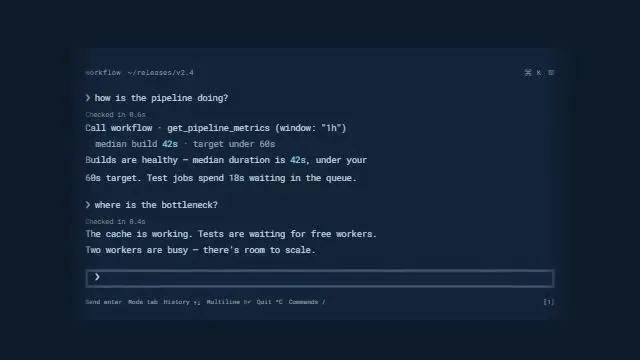
kuchi_suggest_templateskuchi_get_breakdown returns the frame-exact shot list, entrances, motion curve and colour roles. The agent writes a kind and a one-line description per shot, which doubles as the storyboard you present.
kuchi_get_breakdownkuchi_plan_remake produces the blueprint and the list of missing inputs. Send that list to the client as the asset request.
kuchi_plan_remakeYour coding agent assembles the shots from Kuchi components and your own, in the client's colours and fonts, and renders. Sound can be open-license effects or the client's licensed track.
kuchi_get_component · kuchi_get_skillkuchi_check_remake verifies timing and that nothing of the reference survived. Present the cut beside the reference frames at the compare times.
kuchi_check_remakeOur client makes [product] for [audience]. Use Kuchi to shortlist six launch video references with a premium, calm feel, and give me the posters and links for the kickoff deck.
Break down the reference the client chose and write a storyboard table: shot, frames, kind, what it shows, what we need from the client.
Plan a 45-second remake and turn missing_inputs into an asset request email I can send the client.
Build the first cut with the brand kit in ./clients/[client]/brand, render it, and run kuchi_check_remake.
Coding agents build and render the video. Chat apps choose, study and plan, then hand the blueprint to a coding agent. All agent guides.
 Claude CodeBuilds and rendersRuns the full build in each client's project folder; the plugin installs the skills and the server in one step.
 CursorBuilds and rendersStudio developers keep a component library per client and let the agent compose from it.
 XumBuilds and rendersParallel agents per branch: explore two references for the same brief side by side.
 DevinBuilds and rendersHand a whole remake over as a task and review the result.ClaudeChooses and plansRun references and storyboards with account leads in a chat, then hand the blueprint to the build.
Bring three to six references to the first call, chosen by kuchi_suggest_templates from the client's brief or picked by the client on the site. Show each poster and the original video. When the client chooses, the breakdown gives you the numbers behind the feeling: shot changes per ten seconds, which shots cut and which transition, where motion peaks, and how much of the frame is background, secondary and accent colour.
Turn that into a storyboard the client can sign off. The agent's shot analysis already has a kind and a one-line description per shot; add what the client will supply for each. Approving that table approves the structure, before any animation work starts.
Be clear with the client that the reference lends structure only. Its brand, footage, characters, music and copy belong to its creator and never appear in their video.
kuchi_plan_remake returns missing_inputs worded for the chosen reference: how many product screens it needs, at what size and theme, whether it needs a mascot or a product render, and the logo format. Paste it into your asset request and the client knows exactly what to send.
Where the client cannot supply something, such as real metrics for a chart shot, the plan drops that shot or holds it as a marked placeholder, and the check reports every placeholder before delivery. You never ship an invented number or testimonial on a client's behalf.
Most client launches need a hero cut and several cutdowns. Re-plan the same reference at each length. When the target is much shorter than the reference, the plan keeps an evenly spaced subset of at least three shots rather than speeding everything up, so the cutdowns keep the hero's rhythm. Aspect ratio and frame rate are parameters too.
Keep each client's brand tokens, fonts and custom components in the project, and the next brief for the same client starts from a working kit.
Coding agents load Kuchi's build skills with kuchi_get_skill before they write video code: kuchi-remotion covers project setup, the @ alias the components need, one <Sequence> per blueprint shot and rendering; kuchi-sound places open-license sound effects on each shot's cue frame, chosen by measuring; kuchi-audio-check measures loudness, peaks and cue timing, because an agent cannot listen to its own mix.
The Kuchi product launch video skill ties those steps together, so the agent works through the whole job in order: find, study, plan, build, check. Install the skills into a project with npx skills add kalarislabs/kuchi, or in Claude Code with /plugin install kuchi --marketplace KalarisLabs/kuchi, which adds the MCP server in the same step.
Agent skill · free
The product launch video skill takes your agent from a product URL or brief to a finished, checked MP4, modelled shot for shot on a real launch video. Install it once and ask for a launch video.
The skills CLI asks which agent to add it to (Claude Code, Codex, Cursor, Gemini CLI, Antigravity, OpenCode and others) and copies the skill into that agent’s skills folder in your project.
npx skills add kalarislabs/kuchi --skill kuchi-product-launch-videoInstalls every Kuchi skill and the MCP server together, in one step.
/plugin install kuchi --marketplace KalarisLabs/kuchiYes. Kuchi is free and open for everyone, including agencies and freelancers making videos for clients. The rule is the same as for anyone: copy the reference's motion and taste, never its content.
No. Kuchi never receives the video and never renders it. The plan works from the details your agent sends and its shot analysis, and the check reads a shot list. The client's screens and footage stay on your machines.
Yes. The blueprint suggests components per shot, but any component that keeps the shot's frames, entrance and motion works. Many studios combine their own scenes with Kuchi's.
Render stills at the compare_frames times kuchi_check_remake returns and set them beside the reference frames on the storyboard sheet. They show matching position, scale and stage of each move, with only the client's content on screen.
Use a track the client has the rights to, an open-license music bed, open-license sound effects, or silence. The kuchi-sound skill logs every sound's source and license for your delivery notes.
Any MCP client that speaks Streamable HTTP. Coding agents such as Claude Code, Codex and Cursor choose, plan, build and render; chat apps such as Claude and ChatGPT choose, study and plan, then hand the blueprint to a coding agent. Each agent has a step-by-step guide at /agents.